Create SSH keys to access GitHub via SSH
Works in most Operating Systems (Linux/MacOS/Windows)
I am a computer science undergraduate from India with a deep passion for entrepreneurship and technology. Beyond programming, you'll often find me engrossed in chess, maths and diving into algorithmic puzzles. — Ooh and I use Arch, btw.
Dont need if you use github desktop ~
I do this all the time whenever I break my Arch install (ye I have my backups in timeshift, dont teach me now) or I do another distro hop, so thought why not I just put these in my easy website to easy access these commands, instead of typing them always :p
- Open terminal and cd into ssh folder (mkdir ~/.ssh if it doesnt exist there )
cd ~/.ssh
- Update with your GitHub Email Address
ssh-keygen -t rsa -b 4096 -C "arnvgh@gmail.com"
Ignore passphrase (by press Enter key without input any characters) if you want to create a non-passphrase ssh key
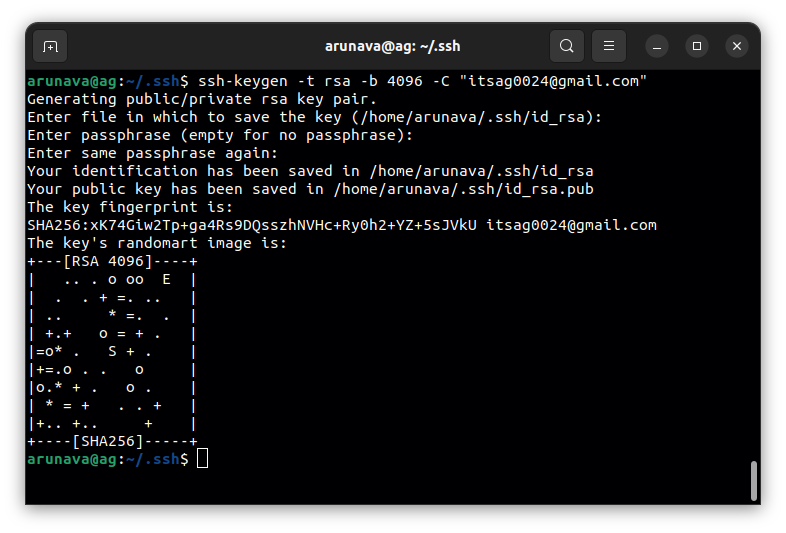
3. Run ssh agent
eval $(ssh-agent -s)
- Add the key has been just generated to ssh agent you can simply run (if you are folllowing my guide)
ssh-add
else
ssh-add "/home/username/.ssh/ssh_file_name"
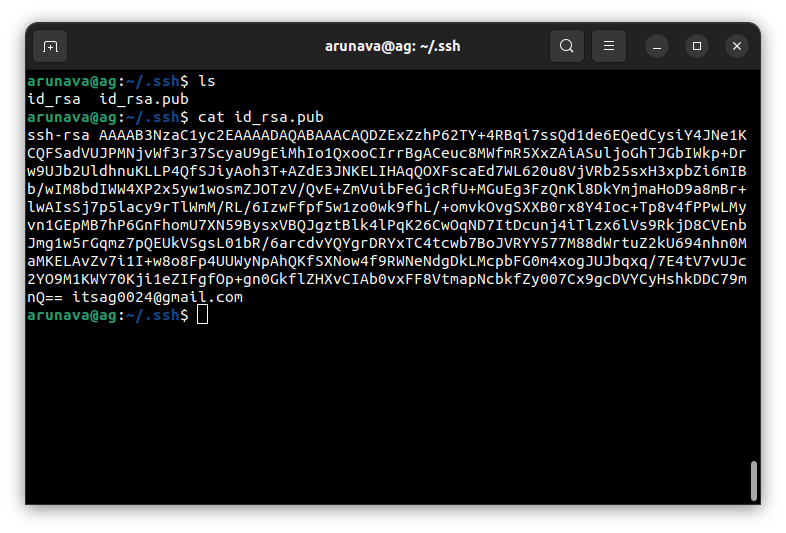
- Copy the SSH Key by
ls
cat id_rsa.pub
(Dont copy mine, I have changed it alr :p)
Finally,
Add the publickey to github account (go to "Setting" then select "SSH and GPG keys")
here ~ https://github.com/settings/keys
Happy Coding 🐼

